Create an embedded checkout page with an individual design. Version 2.0
You can design your own checkout page hosted on your website as a regular HTML + CSS code.
We developed pre-designed example (HTML/CSS/JavaScript) which you can try to use on your site:
Basic checkout design example. Card;
See the Pen Payme - custom checkout light(@payme-uz) on CodePen.
First, you need to import JavaScript SDK:
https://pay.payme.uz/future/checkout-vue/checkout.js
Then CSS files:
https://pay.payme.uz/future/checkout-vue/checkout.css
Checkout page is configured with JavaScript code:
Configuration example
var Options = {
    options: {
        methods: ['card'],
        methods_disabled: [],
        card_icons: ['humo', 'uzcart'],
        active_tab: 'card',
        fields: false,
        title: 'my_title',
        link: 'https://shop.com',
        full_screen: true,
        button: true,
        email: true
    },
    params: {
        merchant_id: 4056281,
        required_rectoken: 'y',
        currency: 'UZS',
        amount: 500,
        order_desc: 'my_order_desc',
        response_url: 'http://shop.com/thankyoupage'
    }
}
checkout("#app", Options);
JavaScript configuration has the following structure:
Configuration structure
{
  options: {},
  params: {},
  button: {}, // button config
  fields_custom: [],
  messages: {},
  css_variable: {},
}
Configure payment page form customization options
| Parameter name | Parameter type | Default value | Description |
|---|---|---|---|
methods |
Array | ['card'] | support card, most_popular, banks, wallets. |
methods_disabled |
Array | [] | support card, most_popular, banks, wallets. |
card_icons |
Array | ['humo', 'uzcard'] | support mastercard, visa, humo, uzcard |
banks_icons |
Array | [] | |
local_methods_icons |
Array | [] | |
crypto_icons |
Array | [] | |
loans_icons |
Array | [] | |
emoney_icons |
Array | [] | |
wallets_icons |
Array | [] | |
title |
String | ||
link |
String | format url | |
full_screen |
Boolean | true | |
locales |
Array | [all] | support uz, az, cs, da, de, en, es, fi, fr, hu, it, ka, ko, lv, nl, pl, ro, ru, sk, uk, zh |
api_domain |
String | 'pay.payme.uz' | |
endpoint |
Object | ||
active_tab |
String | 'card' | support card, most_popular, banks, wallets |
active_method |
String | '' | |
logo_url |
String | format url | |
offerta_url |
String | format url | |
default_country |
String | ||
countries |
Array | ||
theme |
Object | ||
show_menu_first |
Boolean | false | |
disable_request |
Boolean | false | no requests are sent to the server |
subscription |
Object | ||
loading |
String | format url | |
amount_readonly |
Boolean | true | |
autosubmit |
Boolean | false | |
show_amount |
Boolean | true | |
show_email |
Boolean | false | |
show_fee |
Boolean | true | |
show_lang |
Boolean | true | |
show_link |
Boolean | true | |
show_order_desc |
Boolean | true | |
show_pay_button_amount |
Boolean | true | displaying the amount on the button |
show_pay_button |
Boolean | true | |
show_processed |
Boolean | true | |
show_secure_message |
Boolean | true | |
show_test_mode |
Boolean | true | |
show_title |
Boolean | true |
options.theme
| Name | Type | Default | Description |
|---|---|---|---|
type |
String | 'light' | support light, dark. |
preset |
String | 'black' | support reset, black, silver, vibrant_silver, vibrant_gold, solid_black, black_and_white, euphoric_pink, heated_steel, nude_pink, tropical_gold, navy_shimmer. |
layout |
String | 'default' | support default, plain, wallets_only. |
options.subscription
| Name | Type1 | Default | Description |
|---|---|---|---|
type |
String | 'disable' | support disable, hidden, shown_edit_on, shown_edit_off, shown_readonly |
periods |
Array | ['day', 'week', 'month'] | support day, week, month. |
quantity |
Boolean | false | |
trial |
Boolean | false | |
unlimited |
Boolean | true | |
readonly |
Boolean | false |
Order parameters described in Request parameters
| Parameter name | Parameter type | Default value | Description |
|---|---|---|---|
merchant_id |
Integer | 4056281 | |
order_desc |
String | ||
amount |
Integer | null | |
currency |
String | 'UZS' | |
response_url |
String | format url | |
lang |
String | browser language | |
required_rectoken |
String | support Y, N, y, n. |
|
verification |
String | support Y, N, y, n. |
|
token |
String | length 40 | |
button |
String | length 20-80 | |
offer |
Boolean | false | |
recurring_data |
Object | ||
custom |
Object | ||
customer_data |
Object |
params.recurring_data
Subscription parameters values: period, frequency, start date, end date, regular amount
| Name | Type | Default | Description |
|---|---|---|---|
every |
Integer | 1 | |
period |
String | 'month' | support day, week, month. |
amount |
Integer | 0 | |
end_time |
String | format YYYY-MM-DD | |
start_time |
String | format YYYY-MM-DD | |
quantity |
Integer | 0 | |
trial_period |
String | '' | |
trial_quantity |
Integer | 0 |
params.customer_data
| Name | Type | Default | Description |
|---|---|---|---|
customer_name |
String | ||
customer_address |
String | ||
customer_zip |
String | ||
customer_city |
String | ||
customer_country |
String | dictionary countries | |
customer_state |
String | ||
phonemobile |
String | format phone | |
email |
String | format email |
Messages localization
{
  messages: {
    {en}: {
      {id}: {value},
      ...
    },
    ...
  },
}
{
  css_variable: {
    main: {hex color value},
    card_bg: {hex color value},
    card_shadow: {hex color value}
  }
}
{
  fields_custom: {
    id-1: {
      name: 'id-1',
      label: 'label1',
      value: 'value1',
      readonly: true,
      p: 1
    },
    id-2: {
      name: 'id-2',
      label: 'label2',
      value: 'value2',
      p: 2
    },
    id-3: {
      name: 'id-3',
      label: 'label3',
      type: 'checkbox',
      required: true,
      p: 3
    }
  }
}
Below are examples of ready-made designs of payment pages in different styles.
Plain checkout design example for cards
See the Pen Payme - layout plain(@payme-uz) on CodePen.
Plain checkout design example for cards with JS code submit button
See the Pen Payme - layout plain with submit button(@payme-uz) on CodePen.
Example style light background, blue card
See the Pen Payme - custom checkout light(@payme-uz) on CodePen.
Example style dark background, blue card
See the Pen Payme - custom checkout dark(@payme-uz) on CodePen.
Example for compact region
With parameters full_screen: false, hide_title: true, hide_link: true
See the Pen Payme - custom checkout. Compact region(@payme-uz) on CodePen.
Example with additional merchant fields
See the Pen Payme - custom checkout. Additional fields. Version 2.0(@payme-uz) on CodePen.
Example with subscription
After the first successful payment, payment gateway will create a calendar with scheduled regular payments. The frequency and frequency are set in the parameters of the payment page.
See the Pen Payme - custom checkout. Subscription. Version 2.0(@payme-uz) on CodePen.
Example with subscription and localization of custom fields
See the Pen Payme - custom checkout. Subscription. Version 2.0(@payme-uz) on CodePen.
Example with handling of pay-button click event
See the Pen Payme - checkout with own submit buttons. Version 2.0(@payme-uz) on CodePen.
Example with JavaScript callbacks
You can catch response_code value and replace a code message with yours custom.
See all codes.
See the Pen Payme - custom checkout. Javascript calbacks. Version 2.0 by Maxim (@payme-uz) on CodePen.
Example with order created on backend
Create order at your server:
curl -i -X POST \
 -H "Content-Type:application/json" \
 -d \
'{
  "request": {
    "server_callback_url": "http://myshop/callback/",
    "order_id": "TestOrder_JSSDK_v2",
    "currency": "UZS",
    "merchant_id": 4056281,
    "order_desc": "Test payment",
    "lifetime" : 999999,
    "amount": 1000,
    "signature": "91ea7da493a8367410fe3d7f877fb5e0ed666490"
  }
}' \
 'https://pay.payme.uz/api/checkout/token'
Receive order token:
{
  "response":{
    "response_status":"success",
    "token":"b3c178ad84446ef36eaab365b1e12e6987e9b3d9"
  }
}
Load checkout page with order token as a parameter:
var Options = {
  options: {
    methods: ['card'],
    methods_disabled: [],
    card_icons: ['humo', 'uzcard'],
    active_tab: 'card',
    fields: false,
    title: 'Demo checkout',
    link: 'https://shop.com',
    full_screen: true,
    button: true,
    email: true
  },
  params: {
    token: "13c178ad84446ef36eaab365b1e12e6987e9b3d9"
  }
}
checkout("#checkout-container", Options);
Using color presets and personal log
You can use gradient color presets with object theme in the options section.
options: {
  methods: ['card'],
  ...
  ,
  theme: {
    type: "light",
    preset: "black"
}
type attribute can have "light" or "dark" value.
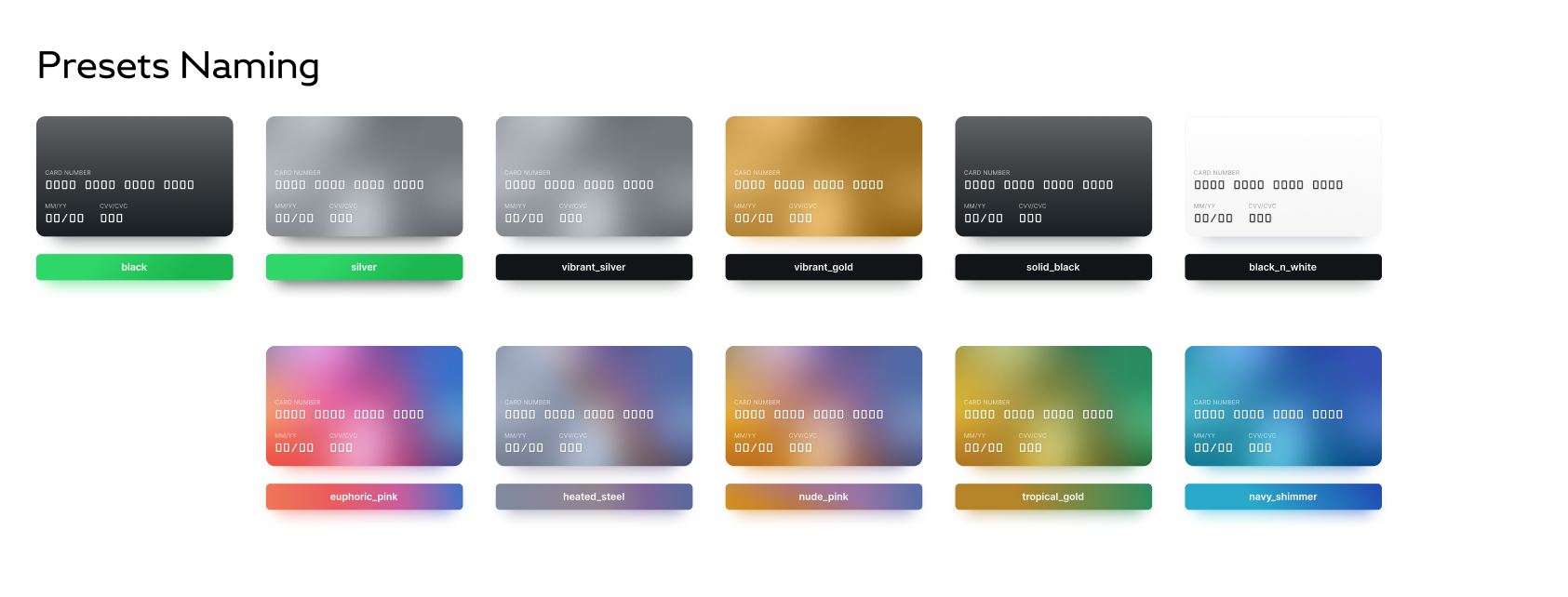
preset attribute can have one of the following values:
vibrant_gold
vibrant_silver
euphoric_pink
black
solid_black
silver
black_and_white
heated_steel
nude_pink
tropical_gold
navy_shimmer
euphoric_pink preset example
See the Pen Payme - minimal checkout ligt euphoric_pink v2.0(@payme-uz) on CodePen.
All gradients naming you can match as follows (click to enlarge image):
You can use custom flat colors with css_variable parameter (to use it, you need to set preset: "reset") as well as own logo with logo_url parameter:
Example with main color: valencia #D94343 for card background and fuchsia_blue: #7054C7 for button color
See the Pen Payme - custom colors by Maxim (@payme-uz) on CodePen.
We recommend to use such colors: